

Top Design Project Management Tools in 2026

The most suitable solutions for design studios in Central Europe are, depending on the size:ProgramaandMyDoma Studiofor small studios (1–3 people),monday.com sau ClickUpwith dedicated configuration for medium teams (4–10), andSmartsheet sau BQE Corefor large studios with complex portfolios.Studios with 2–10 employees lose about 12–15 hours per weekon administrative tasks that dedicated software could automate. Choice is not limited to functions: it matters if the tool understands FF&E, customer approvals, and integration with the CAD you are already using.
- Small studio (1–3 people):Curriculum or MyDoma Studio — native FF&E templates, client portal and billing without additional configuration.
- Medium studio (4–10 people):monday.com or ClickUp — great flexibility, but requires an operations manager to set up design-specific flows.
- Large studio (>10 people /multiple teams):Smartsheet or BQE Core — structured planning, scalable Gantt and serious accounting integration.
- Projects with complex furniture procurement:pCon (pCon.planner + pCon.basket) — CPQ configuration and OFML export directly from the 3D project.
- Architecture and buildingNewforma or Microsoft Project — tracking technical documents and large-scale planning.
- SelfDezignappears in this list as an implementation and consulting service: if you want to adopt a tool without wasting weeks in setup, the SelfDezign team can take over the onboarding process, adapting flows, and integrating with technical deliverables.
The main findings
Specialized design tools solve FF&E, customer approvals, and per milestone billing more effectively than any ad-hoc configured generic platform.
|
Punct |
Detalii |
|---|---|
|
Specialized vs. generic tools |
The syllabus and MyDoma Studio have native FF&E; monday.com and ClickUp ask for 2–4 weeks dedicated setup. |
|
Priority of functions |
Customer approvals and FF&E management matter more than Gantt or advanced reporting for small studios. |
|
Pre-Decision Testing |
Set a real project and measure the setup time; if you exceed 2 hours, the adoption curve is high. |
|
Location Central Europe |
Verify multi-currency support, data storage on EU servers, and integration with local accounting prior to purchase. |
|
SelfDesign as an implementation option |
SelfDezign provides turnkey consulting and implementation for studios that want to adopt a tool without losing weeks in setup. |
Which design project management tools are worth comparing?
Tools built for software or construction do not naturally fit a designer's flow: Lack of Visual Asset Management, Customer Approval Flows and Live Budget FF&E Management. The table below compares 12 solutions on the axes that actually matter for a design studio in Central Europe.
A few quick notes:Curriculum and MyDoma Studio are the only ones on the list that treat FF&E as a native function, not as an adaptation. [Wednesday] com and ClickUp win at flexibility, but demand real investment in setup. pCon is in a separate category: it is not a PM tool, but a configuration and quote ecosystem for furniture, complementary to any of the above tools.
How does each tool work in the practice of a design studio?
Curriculum and MyDoma Studio: native to design
The curriculum offers FF&E templates, client portal and integrated billing, designed for a designer's flow, not a generic project manager. A typical workflow: you create the project, add FF&E rows on rooms, submit for approval to the customer through the portal, then generate the invoice from the same screen. MyDoma Studio works similarly with a focus on visual presentations and moodboards. Both have accessible plans and low adoption curve, making them suitable for small studios that do not have a system administrator.
- FF&E on cameras, with status per product (approved, pending, ordered)
- Customer portal with digital approval, no chain emails
- Billing related to project milestones
- Integration with Dropbox and Google Drive for visual assets
- Limitation: Partial multi-currency support without native integration with local Central European accounting
Foyr Manage: AI automation for planning and billing
Foyr Manage positions itself as an AI-led solution, with estimated-to-invoice, customer dashboards and integrated sourcing. The real advantage is that planning and estimation are connected: you change an item in the specifications and the budget is automatically recalculated. Suitable for studios that want to reduce manual recalculation work but require an onboarding period to set up product catalogs.
- Auto estimate related to specifications
- Client dashboard with real-time visibility
- Integrated product sourcing
- Limitation: availability and prices for Central Europe are not explicitly published
monday.com, ClickUp and Asana: flexibility with setup price
These three platforms are constantly appearing in the top lists for architects and designers, but they are horizontal tools: I don't know what an FF&E row or a customer approval is unless you set them up yourself. [Wednesday] com has visual boards and over 200 integrations. ClickUp offers multiple views (kanban, Gantt, list, calendar) and a generous free plan. Asana is simpler and cleaner, suitable for teams that want clarity in tasks without complex procurement needs.
- All three support EUR and are available in Central Europe
- Requires an operations manager for initial setup (2–4 weeks)
- Integration with QuickBooks, Xero and Google Drive available
- Limitation: no native FF&E, no dedicated client portal for design
Professional advice:*If you choose monday.com or ClickUp, start with an existing design project template from their marketplace, not from scratch.
Smartsheet, Wrike and Microsoft Project: for large teams
Smartsheet excels at structured planning and scalable Gantt, suitable for studios with 10+ simultaneous project portfolios. Wrike adds resource management and advanced reporting. Microsoft Project remains the standard for large construction projects with native integration into the Microsoft 365 ecosystem. All three have a high learning curve and are oversized for a small studio.
pCon: Furniture Configuration Ecosystem
pCon connects 3D design with product configuration and bidding: pCon. planner has free version, pCon. pro includes OFML and commercial data for bidding. It does not replace a PM tool, but is complementary to any of the above solutions when the project involves complex furniture procurement. Available locally via pcon. ro, with support in Romanian and prices in EUR/Ron.
BQE Core, Newforma and Sage: for architecture and financial control
BQE Core is built for architecture firms that need timesheet, advanced billing and project-level financial reporting. Newforma focuses on technical document management and communication with contractors. Sage covers firm-level accounting, not project management itself. All three are suitable for organizations with complex financial processes and dedicated management teams.
Simpler profile tools
Trelloremains the easiest to adopt: visual kanban, power-ups for integrations, free plan. Suitable for a single designer who wants to organize tasks without investing time in setup.BonsaiandTeamGanttcovers specific niches: Bonsai for contracts and freelance invoicing, TeamGantt for simplified Gantt planning.HubSpotandZoho Projectsare more suitable for teams that combine CRM with project management.TeamworkʼWorksectionʼStrivenʼJira SoftwareʼGatherandDesign Managercompletes the spectrum, each with a different focus: Jira for technical teams with agile processes, Design Manager for QuickBooks integration and financial control, Gather for visual collaboration in virtual spaces.
How do you choose the right tool for your studio?
What to check before the demo
The right prioritization for a design studio follows a clear order: first the management of visual assets and client approvals, then the visibility of tasks and timeline, and only after that the live budget and accounting integration. The rest are additional functions.
Must-have for any design studio:
- FF&E management with status per product (approved, ordered, delivered)
- Customer approval with traceability (who approved, when)
- File storage integration (Dropbox, Google Drive or similar)
- Billing related to project milestones
- Functional mobile application for work on site
Nice-to-have, depending on complexity:
- Native multi-currency support (important for international projects)
- CAD integration (SketchUp, Revit, AutoCAD, pCon)
- Local accounting integration (Xero, QuickBooks or local providers)
- Team Resource and Capacity Management
How does SelfDesign manage projects in practice?
The SelfDesign internal flow starts at the brief and ends at the handover, with clear and deliverable phases defined at each stage. The structure of a typical project looks like this:
- Brief and concept:briefing document validated by the customer, approved moodboard, agreed indicative budget.
- Technical design:versioned technical plans, FF&E specifications by rooms, list of suppliers.
- Client signoffeach round of changes is documented; the customer signs the approval before ordering any product.
- Coordination of execution:milestone calendar related to supplier deliveries, site checklist.
- Handoverfinal file with all specifications, warranties and technical documentation.
Internally used templates include: FF&E row with fields for supplier, product reference, price, status and room; milestone calendar with phase dependencies; and customer approval checklist with signature and date fields. Details ofthe complete flow of an interior projectand aboutrisk managementare available in the SelfDezign log.
Professional advice: Binds estimated-to-invoice from the first phase of the project: each approved product in the FF&E automatically enters the budget calculation and becomes the basis of the milestone invoice. Thus, the project margin remains visible in real time, not just at the end.
Specialized solutions reduce integration effort for FF&E and procurement; combining Excel + Dropbox + email generates version errors and lost time in reconciliation. The SelfDezign experience confirms that switching to a dedicated tool, even partially, changes the quality of communication with the customer more than any other operational intervention.
What is the verdict and how do you test in 72 hours?
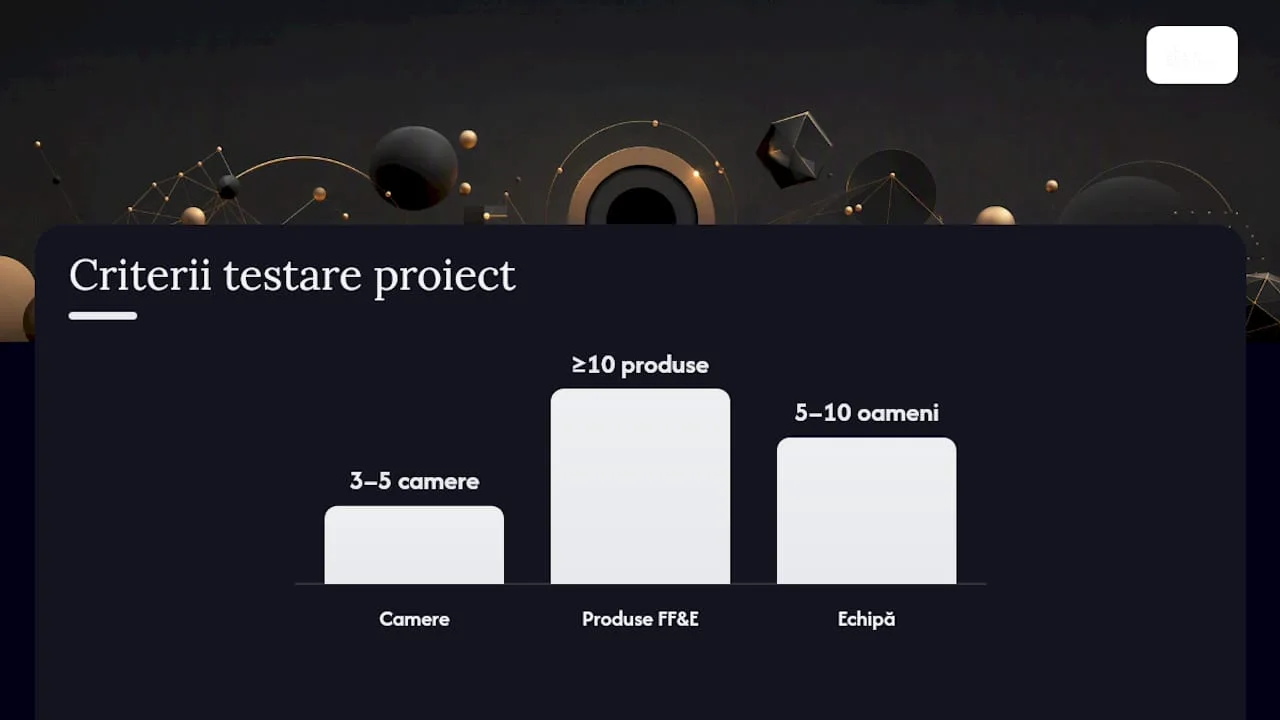
The practical recommendation, in short: if you are a small studio, start with the Curriculum or MyDoma Studio. If you have a team of 5–10 people and an operations manager, monday.com or ClickUp is worth setting up. If you run a complex billing architecture firm, BQE Core or Smartsheet are better suited.
3-step plan to test in 72 hours:
- Sets a real project (day 1):import an existing project with 3–5 rooms and at least 10 FF&E products. Measure setup time: if you exceed 2 hours, the tool has a high adoption curve for your team.
- Tests FF&E and customer approval (day 2):sends an actual specification for approval to a customer or colleague playing the role of the customer. Check if the flow is clear without further instructions.
- Simulate billing (day 3):generates a milestone invoice from the data entered. If you need to manually copy data from one screen to another, the tool has no actual estimated-to-invoice integration.
Testing on a real project, with measurement of set-up time and ability to import FF&E specifications, is the recommended method before any purchase decision. For implementation and integration with existing technical flows,SelfDezign can coordinate the processfrom the choice of tool to the first project delivered completely in the new system.
SelfDesign Perspective on Adopting a Management Tool
Choosing a management tool is not a technical decision. It's a business decision and, ultimately, a brand decision: how do you want your customer's experience to look from the first brief to the handover?
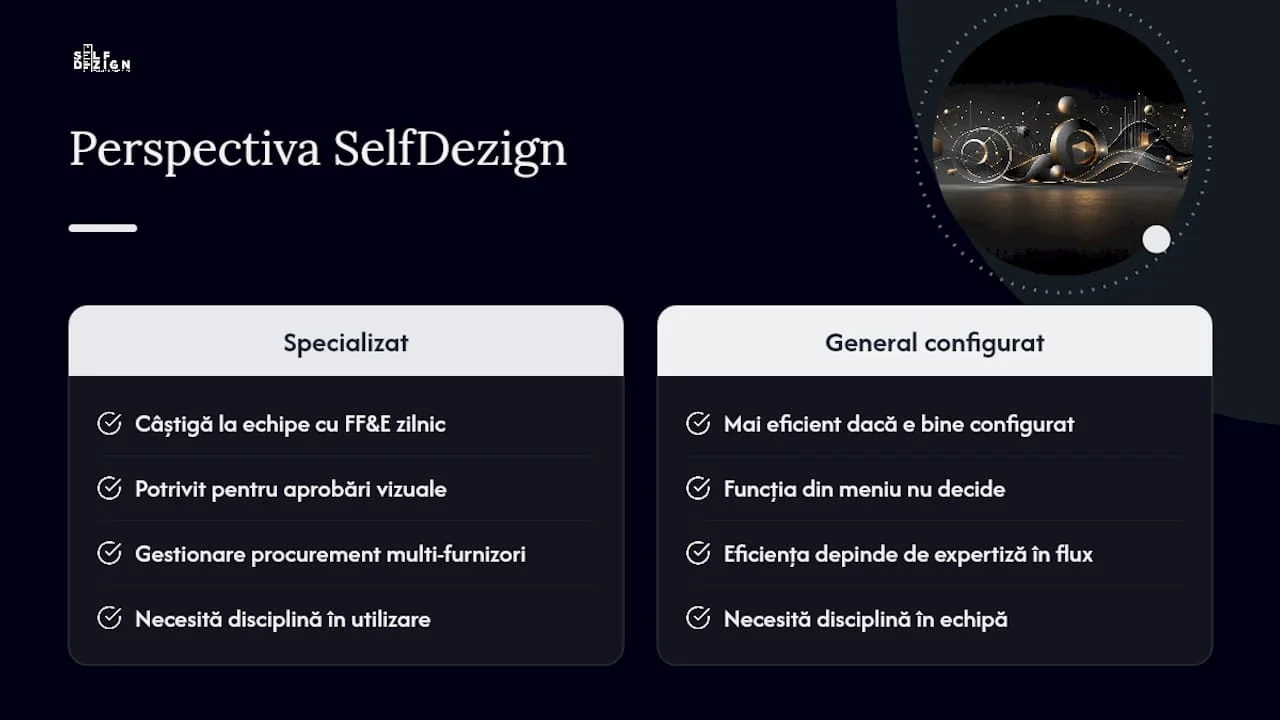
Specialized design tools clearly win when your team works daily with FF&E, visual approvals, and procurement from multiple vendors. But a general tool, well configured by someone who understands the design flow, can be more effective than a superficially adopted specialized tool. The difference is not the function on the menu, but the discipline with which the team uses it.
Onboarding and changing the internal process are the real costs of adoption, not the monthly subscription. A studio that switches from Excel to any dedicated platform will lose 2–4 weeks of productivity during the transition period. Anticipate it, budget it, and treat it as an investment, not a loss. The benefit comes after: less time in approval emails, less confusion between specification versions and a real-time visible project margin, not reconstructed at the end.
How SelfDezign can help you with project implementation and coordination
There are good tools in this list, each with its own strengths. But choosing the right tool and setting it up for the actual flow of your studio are two different things. SelfDezign offers workflow and implementation consultancy for design studios in Central Europe: from selecting the right solution for the size and complexity of your projects, to configuring FF&E templates, milestone calendar and customer approval flow.
A typical implementation package covers: analysis of the existing flow, configuration of the chosen tool, templates adapted to the type of projects (residential, commercial, hospitality) and a training session with the team. Duration: 2–4 weeks, depending on complexity. If you work onoffice projectsor onhoreca projects, the SelfDezign team knows the specifics of these flows from direct practice. Contact us for a discussion about which tool and configuration best suits your situation.
Surse
Prices and features are subject to change; check directly with the vendor before any purchase decision.
- The Complete Guide to Interior Design Project Management Software
- Project Management Software for Interior Designers – Project Management Formula
- Project Studio | Interior Design & Construction Software
- pCon
- 10 best project management software for architects